WhatsApp MCP server for Mac
Orbit is a native Mac app for several WhatsApp accounts with a built-in, local MCP server. Connect Claude Desktop, Claude Code or another MCP host, and your assistant can search your conversations, read the context, translate and draft replies. You choose which accounts it sees, and nothing is sent without your approval.
What is a WhatsApp MCP server?
MCP (Model Context Protocol) is an open standard that lets AI assistants call tools. A WhatsApp MCP server exposes your WhatsApp conversations as tools an assistant can use: find a message, read the thread around it, prepare a reply. Many WhatsApp MCP servers are scripts that read the WhatsApp Desktop database or drive the app through automation, for one account. Orbit builds it into a native Mac app that already runs your accounts, so the server, the permissions and the approvals live in one place.
What your assistant can do
- Find it across accounts. Search cached conversations in every account you granted, filtered by sender, type and date, then pull up to 20 messages of context around a result.
- Catch up. List what is unread, awaiting your reply or mentions you, across your personal and business accounts.
- Reply in their language. Translate a thread and draft a reply in your contact’s language, in native script or romanized. Quality depends on the assistant you connect. Orbit can also translate English, French and Thai on your Mac (macOS 26 or later).
- Prepare, not just send. Set a draft you finish yourself, send text or attachments, reply, react, forward or schedule text messages up to 366 days ahead.
- Organise. Pin, archive, mute, mark read or unread, manage groups, and open a chat in Orbit’s window.
Twenty-three tools in total. The full list, with every limit, is in the tool reference.
Why it is safe to connect
It stays on your Mac
The MCP adapter is bundled inside Orbit and talks to the running app over a private, owner-only Unix socket. There is no public network listener. The adapter never opens WhatsApp databases and never launches Orbit by itself.
AI host → orbit-mcp adapter (stdio) → private Unix socket → Orbit app → permission check / your approval → account helper → WhatsAppReading never touches your chats
Reads use only history already cached on the Mac. They never open chats, clear unread counts, download media or send read receipts. Voice messages and calls are excluded from MCP.
You decide, per account and per action
Owner limits apply to every client; each named client then gets its own grant, which can never exceed them. New accounts are never granted automatically, and an assistant cannot change its own grants, tokens or folders. Seven action policies are each set to Ask, Allow or Deny:
| Policy | Covers | Default |
|---|---|---|
| Sends | Text, attachments, replies, edits, forwards | Ask |
| Reactions | Adding and removing reactions | Ask |
| Workspace | Account, chat, window and preference controls | Ask |
| Files | Staging, previews, Finder reveal, exports | Ask |
| Destructive | Deleting conversations, removing accounts | Ask |
| Linking codes | Showing a QR code to link a new account | Ask |
| Quit | Quitting Orbit | Deny |
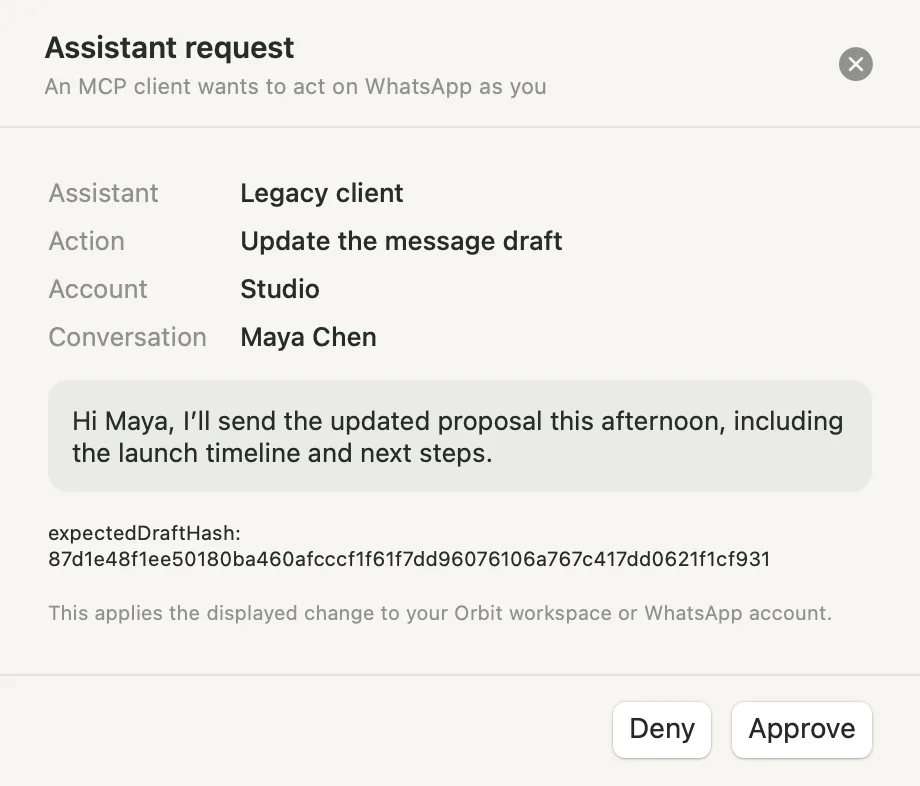
Under Ask, Orbit shows a native approval sheet naming the client, the account, the conversation and the exact text. Unapproved requests expire after five minutes. Every write carries an idempotency key, so a retry never sends twice.
Your assistant host may forward the content you permit to its AI provider, under that provider’s policies. Grant only the accounts and scopes you need.
Connect Claude in one click
- In Orbit, open Settings › MCP, choose the accounts Claude can use and a preset.
- Click Connect Claude Desktop. Orbit adds an
orbitentry to Claude Desktop’s configuration, keeps your other settings and saves a backup. - Quit and reopen Claude Desktop, then ask it to list your Orbit accounts.
For Claude Code, Settings › MCP can also add an approval hook so Claude Code shows you the exact message, and its translation when provided, before anything is sent, edited, forwarded, deleted or scheduled.
Any other MCP host
Add a named client in Settings › MCP › Advanced, set its accounts and permissions (new clients start with none), then paste the generated configuration into your host:
{
  "mcpServers": {
    "orbit": {
      "command": "/Applications/Orbit.app/Contents/Helpers/orbit-mcp",
      "env": { "ORBIT_MCP_TOKEN": "<shown once in Orbit>" }
    }
  }
}
ChatGPT and other remote hosts may need a secure tunnel to reach a local server; a ChatGPT session has not been verified yet.
Things to ask
- “What is still waiting for my reply in my Studio and Work accounts?”
- “Find Maya’s message about the updated proposal and summarise the thread.”
- “Translate my last conversation with the supplier and draft a reply in Thai. Don’t send it.”
- “Schedule a reminder to the team group for Monday 9:00, Bangkok time.”
Proof, not promises
The demo on the home page replays an actual MCP session against the native app in an isolated, fictional workspace: search, context, the approval sheet and the resulting draft. You can inspect the complete recording of requests and responses.
Plans
Local MCP is included in Pro (5 accounts, $19.99) and Studio (20 accounts, $49.99), USD per 30 days. Free (1 account) and Plus (3 accounts) do not include MCP. See pricing.
Questions
Does Orbit’s MCP server work with Claude Desktop and Claude Code?
Yes. Claude Desktop connects in one click from Settings › MCP, and Claude Code can use the generated configuration plus an optional approval hook.
Can an assistant send WhatsApp messages without my approval?
Not by default. Sends, reactions, files and destructive actions default to Ask, so Orbit shows a native approval sheet first. You can change each policy to Allow or Deny, per client.
Does reading through MCP mark messages as read?
No. Reads use the cache on your Mac and never open chats, clear unread counts or send read receipts.
Can it use several WhatsApp accounts at once?
Yes. Each client is granted specific accounts, and search and inbox tools work across all the accounts you granted, personal and business.
Is Orbit affiliated with WhatsApp?
No. Orbit is an independent Mac app by SabaiDev and links existing accounts by QR code through an unofficial provider. It is not affiliated with WhatsApp, Meta, Anthropic or OpenAI.